---
title: "Adding Red-Eye Removal Functionality to AJAX Applications"
canonical: https://www.graphicsmill.com/docs/gm5/AddingRedEyeRemovalFunctionalitytoAjaxApplications.htm
product: "Graphics Mill 5.5 for .NET"
---

This documentation is for the old version. [Go to the latest Graphics Mill docs](https://www.graphicsmill.com/docs/gm/)

# Adding Red-Eye Removal Functionality to AJAX Applications
 
Red-Eye Removal cannot work in 100% automatic mode (i.e. without any user interaction). That's why it is necessary to design convenient user interface. This topic discusses how to organize the user interface for red-eye removal functionality in Web application.
 
- Semiautomatic Red-Eye Removal
- Manual Red-Eye Removal
- Wizard-like Red-Eye Removal

## Semiautomatic Red-Eye Removal
  
In semiautomatic mode it is necessary to provide ability to select red-eyed face. Ideal solution for that is to use the [Aurigma.GraphicsMill.AjaxControls.RectangleRubberband](https://www.graphicsmill.com/docs/gm5/T_Aurigma_GraphicsMill_AjaxControls_RectangleRubberband.htm.md) class in a combination with the [Aurigma.GraphicsMill.AjaxControls.BitmapViewer](https://www.graphicsmill.com/docs/gm5/T_Aurigma_GraphicsMill_AjaxControls_BitmapViewer.htm.md). See the [Using Navigators and Rubberbands (AJAX Controls)](https://www.graphicsmill.com/docs/gm5/AjaxControlsUsingNavigatorsandRubberbands.htm.md) topic for more information about rubberbands.
 
After the user selects a face, they need to click some button will run the server-side code which will initiate semiautomatic red-eye removal process. It can be done in two ways: using roundtrip and remote scripting approach.
 
### Roundtrip Approach
 
In the simplest case it can be done via common ASP.NET server button control which uses roundtrip approach:
 
```
<%@ Page Language="vb" AutoEventWireup="True" %>
<%@ Register Assembly="Aurigma.GraphicsMill.AjaxControls" Namespace="Aurigma.GraphicsMill.AjaxControls"TagPrefix="aur" %>
<script runat="server" language="VB">
Private Sub Page_Load(ByVal sender As System.Object, ByVal e As System.EventArgs)If Not Page.IsPostBack Then	BitmapViewer1.Bitmap.Load(Server.MapPath("TestImages/RedEye5.jpg"))End If
End Sub

Private Sub ButtomRemove_Click(ByVal sender As System.Object, ByVal e As System.EventArgs)
Dim redEyeRemoval As New Aurigma.GraphicsMill.Transforms.RedEyeRemoval()redEyeRemoval.Mode = Aurigma.GraphicsMill.Transforms.RedEyeRemovalMode.SemiautomaticredEyeRemoval.FaceRegion = RectangleRubberband1.RectangleredEyeRemoval.ApplyTransform(BitmapViewer1.Bitmap)

End Sub
</script>
<html><head>	<title>Red Eye Removal</title></head><body>	<form runat="server">
            <asp:ScriptManager runat="server" ID="ScriptManager1" />					<asp:Button ID="ButtomRemove" runat="server" Text="Remove" OnClick="ButtomRemove_Click" />		<aur:BitmapViewer ID="BitmapViewer1" runat="server" Height="350px" Width="400px" Rubberband="RectangleRubberband1"></aur:BitmapViewer>		<aur:RectangleRubberband ID="RectangleRubberband1" runat="server" OutlineColor="Blue" GripsVisible="True"			OutlineStyle="Solid" />	</form></body>
</html>
```
 
```csharp
<%@ Page Language="C#" AutoEventWireup="True" %>
<%@ Register Assembly="Aurigma.GraphicsMill.AjaxControls" Namespace="Aurigma.GraphicsMill.AjaxControls"TagPrefix="aur" %>
<script runat="server" language="C#">
private void Page_Load(System.Object sender, System.EventArgs e)
{if (!Page.IsPostBack){	BitmapViewer1.Bitmap.Load(Server.MapPath("TestImages/RedEye5.jpg"));}
}

private void ButtomRemove_Click(System.Object sender, System.EventArgs e)
{	Aurigma.GraphicsMill.Transforms.RedEyeRemoval redEyeRemoval = 	new Aurigma.GraphicsMill.Transforms.RedEyeRemoval();redEyeRemoval.Mode = Aurigma.GraphicsMill.Transforms.RedEyeRemovalMode.Semiautomatic;redEyeRemoval.FaceRegion = RectangleRubberband1.Rectangle;redEyeRemoval.ApplyTransform(BitmapViewer1.Bitmap);
}
</script>
<html><head>	<title>Red Eye Removal</title></head><body>	<form id="Form1" runat="server">
            <asp:ScriptManager runat="server" ID="ScriptManager1" />				<asp:Button ID="ButtomRemove" runat="server" Text="Remove" OnClick="ButtomRemove_Click" />		<aur:BitmapViewer ID="BitmapViewer1" runat="server" Height="350px" Width="400px" Rubberband="RectangleRubberband1"></aur:BitmapViewer>		<aur:RectangleRubberband ID="RectangleRubberband1" runat="server" OutlineColor="Blue" GripsVisible="True"			OutlineStyle="Solid" />	</form></body>
</html>
```
 
### Remote Scripting Approach
 
To avoid roundtrip, we can use [remote scripting](https://www.graphicsmill.com/docs/gm5/AjaxControlsRemoteScripting.htm.md) features of Graphics Mill for .NET:
 
```
<%@ Page Language="vb" AutoEventWireup="True" %>
<%@ Register Assembly="Aurigma.GraphicsMill.AjaxControls" Namespace="Aurigma.GraphicsMill.AjaxControls"TagPrefix="aur" %>
<script runat="server" language="VB">
Private Sub Page_Load(ByVal sender As System.Object, ByVal e As System.EventArgs)If Not Page.IsPostBack Then	BitmapViewer1.Bitmap.Load(Server.MapPath("TestImages/RedEye5.jpg"))End If
End Sub

    <Aurigma.GraphicsMill.AjaxControls.RemoteScriptingMethod()> _
Public Sub RemoveRedEyeSemiautomatically(ByVal faceLeft As Integer, ByVal faceTop As Integer, _
 ByVal faceWidth As Integer, ByVal faceHeight As Integer)
        Dim redEyeRemoval As New Aurigma.GraphicsMill.Transforms.RedEyeRemoval()
        redEyeRemoval.Mode = Aurigma.GraphicsMill.Transforms.RedEyeRemovalMode.Semiautomatic
        redEyeRemoval.FaceRegion = New System.Drawing.RectangleF(faceLeft, faceTop, faceWidth, faceHeight)
        redEyeRemoval.ApplyTransform(BitmapViewer1.Bitmap)

    End Sub
</script>
<html><head>	<title>Red Eye Removal</title>

<script type="text/javascript">
function Remove_click(){
    var rectangleRubberband1 = $find("RectangleRubberband1");
    var bitmapViewer1 = $find("BitmapViewer1");var r=rectangleRubberband1.get_rectangle();
if (r.width < 1 || r.height < 1){	alert("Please select rectangle with width and height larger then 1 pixel.");	return;}
    bitmapViewer1.invokeRemoteMethod("RemoveRedEyeSemiautomatically", new Array(r.x, r.y, r.width, r.height));
}
</script>
</head><body>	<form runat="server">	    <input type="button" value="Remove" onclick="Remove_click()" />		<asp:ScriptManager runat="server" ID="ScriptManager1" />		<aur:BitmapViewer ID="BitmapViewer1" runat="server" Height="350px" Width="400px" Rubberband="RectangleRubberband1"></aur:BitmapViewer>		<aur:RectangleRubberband ID="RectangleRubberband1" runat="server" OutlineColor="Blue" GripsVisible="True"			OutlineStyle="Solid" />	</form></body>
</html>
```
 
```csharp
<%@ Page Language="C#" AutoEventWireup="True" %>
<%@ Register Assembly="Aurigma.GraphicsMill.AjaxControls" Namespace="Aurigma.GraphicsMill.AjaxControls"TagPrefix="aur" %>
<script runat="server" language="C#">
private void Page_Load(System.Object sender, System.EventArgs e)
{if (!Page.IsPostBack){	BitmapViewer1.Bitmap.Load(Server.MapPath("TestImages/RedEye5.jpg"));}
}

[Aurigma.GraphicsMill.AjaxControls.RemoteScriptingMethodAttribute()]
public void RemoveRedEyeSemiautomatically(int faceLeft, int faceTop, int faceWidth, int faceHeight)
{		Aurigma.GraphicsMill.Transforms.RedEyeRemoval redEyeRemoval = 	new Aurigma.GraphicsMill.Transforms.RedEyeRemoval();redEyeRemoval.Mode = Aurigma.GraphicsMill.Transforms.RedEyeRemovalMode.Semiautomatic;redEyeRemoval.FaceRegion = new System.Drawing.RectangleF(faceLeft, faceTop, faceWidth, faceHeight);
redEyeRemoval.ApplyTransform(BitmapViewer1.Bitmap);
}
</script>

<script type="text/javascript">
function Remove_click(){
    var rectangleRubberband1 = $find("RectangleRubberband1");
    var bitmapViewer1 = $find("BitmapViewer1");var r=rectangleRubberband1.get_rectangle();
if (r.width < 1 || r.height < 1){	alert("Please select rectangle with width and height larger then 1 pixel.");	return;}
    bitmapViewer1.invokeRemoteMethod("RemoveRedEyeSemiautomatically", new Array(r.x, r.y, r.width, r.height));
}
</script>

<html><head>	<title>Red Eye Removal</title>
</head><body>	<form id="Form1" runat="server">		<input type="button" value="Remove" onclick="Remove_click()" />		<asp:ScriptManager runat="server" ID="ScriptManager1" />		<aur:BitmapViewer ID="BitmapViewer1" runat="server" Height="350px" Width="400px" Rubberband="RectangleRubberband1"></aur:BitmapViewer>		<aur:RectangleRubberband ID="RectangleRubberband1" runat="server" OutlineColor="Blue" GripsVisible="True"			OutlineStyle="Solid" />	</form></body>
</html>
```
 
The semiautomatic red-eye removal code is discussed more detailed in the [Semiautomatic Red-Eye Removal](https://www.graphicsmill.com/docs/gm5/SemiautomaticRedEyeRemoval.htm.md) topic.
 
## Manual Red-Eye Removal
  
When red-eye removal is made in manual mode, it is required not only select a face, but also pick eyes with a mouse. Most convenient both from developer and user point of view would be to handle the [WorkspaceClick](https://www.graphicsmill.com/docs/gm5/E_Aurigma_GraphicsMill_AjaxControls_BaseViewer_WorkspaceClick.htm.md) event of the BitmapViewer. You also use either roundtrip or remote scripting approach.
 
### Roundtrip Approach
 
To be able to use server events with roundtrip, it is necessary to enable automatic postback generation on the WorkspaceClick event. It can be done by setting [PostBackOnWorkspaceClick](https://www.graphicsmill.com/docs/gm5/P_Aurigma_GraphicsMill_AjaxControls_ViewerClientSideOptions_PostBackOnWorkspaceClick.htm.md) to `true` value.
 
**Note** 
It is not recommended to use the [AutoPostBack](https://www.graphicsmill.com/docs/gm5/P_Aurigma_GraphicsMill_AjaxControls_BaseViewer_AutoPostBack.htm.md) instead of PostBackOnWorkspaceClick. The AutoPostBack will cause automatic postback for each event raised by the control, including scroll, bitmap change, etc. This way you may suffer from a big number of unwanted roundtrips. In the same time the PostBackOnWorkspaceClick will cause postback only for the WorkspaceClick event.
 
Here is code which utilizes this approach:
 
```
<%@ Page Language="vb" AutoEventWireup="True" %>
<%@ Register Assembly="Aurigma.GraphicsMill.AjaxControls" Namespace="Aurigma.GraphicsMill.AjaxControls"TagPrefix="aur" %>
<script runat="server" language="VB">
Private Sub Page_Load(ByVal sender As System.Object, ByVal e As System.EventArgs)If Not Page.IsPostBack Then	BitmapViewer1.Bitmap.Load(Server.MapPath("TestImages/RedEye5.jpg"))End If
End Sub

    Private Sub BitmapViewer_Click(ByVal sender As Object, ByVal e As Aurigma.GraphicsMill.AjaxControls.WorkspaceClickEventArgs)
        Dim redEyeRemoval As New Aurigma.GraphicsMill.Transforms.RedEyeRemoval()
        redEyeRemoval.Mode = Aurigma.GraphicsMill.Transforms.RedEyeRemovalMode.Manual
        redEyeRemoval.EyePoint = New System.Drawing.PointF(e.X, e.Y)
        redEyeRemoval.ApplyTransform(BitmapViewer1.Bitmap)
    End Sub
</script>
<html><head>	<title>Red Eye Removal</title></head><body>	<form id="Form1" runat="server">	    <asp:ScriptManager runat="server" ID="ScriptManager1" />		<aur:BitmapViewer ID="BitmapViewer1" runat="server" Height="350px" Width="400px" ClientSideOptions-PostBackOnWorkspaceClick="true"		OnWorkspaceClick="BitmapViewer_Click"></aur:BitmapViewer>	</form></body>
</html>
```
 
```csharp
<%@ Page Language="C#" AutoEventWireup="True" %>
<%@ Register Assembly="Aurigma.GraphicsMill.AjaxControls" Namespace="Aurigma.GraphicsMill.AjaxControls"TagPrefix="aur" %>
<script runat="server" language="C#">
private void Page_Load(System.Object sender, System.EventArgs e)
{if (!Page.IsPostBack){	BitmapViewer1.Bitmap.Load(Server.MapPath("TestImages/RedEye5.jpg"));}
}

private void BitmapViewer_Click(Object sender, Aurigma.GraphicsMill.AjaxControls.WorkspaceClickEventArgs e)
{Aurigma.GraphicsMill.Transforms.RedEyeRemoval redEyeRemoval =	new Aurigma.GraphicsMill.Transforms.RedEyeRemoval();redEyeRemoval.Mode = Aurigma.GraphicsMill.Transforms.RedEyeRemovalMode.Manual;redEyeRemoval.EyePoint = new System.Drawing.PointF((float)(e.X), (float)(e.Y));
redEyeRemoval.ApplyTransform(BitmapViewer1.Bitmap);
}

</script>
<html><head>	<title>Red Eye Removal</title></head><body>	<form runat="server">	    <asp:ScriptManager runat="server" ID="ScriptManager1" />		<aur:BitmapViewer ID="BitmapViewer1" runat="server" Height="350px" Width="400px" ClientSideOptions-PostBackOnWorkspaceClick="true"		OnWorkspaceClick="BitmapViewer_Click"></aur:BitmapViewer>	</form></body>
</html>
```
 
### Remote Scripting Approach
 
If you prefer AJAX technique and want to avoid roundtrips at all, you should handle the [workspaceClick](https://www.graphicsmill.com/docs/gm5/E_J_GraphicsMill_BaseViewer_workspaceClick.htm.md) client-side event and invoke manual red-eye removal process from it:
 
```
<%@ Page Language="vb" AutoEventWireup="True" %>
<%@ Register Assembly="Aurigma.GraphicsMill.AjaxControls" Namespace="Aurigma.GraphicsMill.AjaxControls"TagPrefix="aur" %>
<script runat="server" language="VB">
    Private Sub Page_Load(ByVal sender As System.Object, ByVal e As System.EventArgs)
        If Not Page.IsPostBack Then
            BitmapViewer1.Bitmap.Load(Server.MapPath("TestImages/RedEye5.jpg"))
        End If
    End Sub
    <Aurigma.GraphicsMill.AjaxControls.RemoteScriptingMethod()> _
    Public Sub RemoveRedEyeManually(ByVal eyeX As Integer, ByVal eyeY As Integer)
        Dim redEyeRemoval As New Aurigma.GraphicsMill.Transforms.RedEyeRemoval()
        redEyeRemoval.Mode = Aurigma.GraphicsMill.Transforms.RedEyeRemovalMode.Manual
        redEyeRemoval.EyePoint = New System.Drawing.PointF(eyeX, eyeY)
        redEyeRemoval.ApplyTransform(BitmapViewer1.Bitmap)
    End Sub
</script>
<html><head>	<title>Red Eye Removal</title></head><body>	<form runat="server">	    <asp:ScriptManager runat="server" ID="ScriptManager1" />		<aur:BitmapViewer ID="BitmapViewer1" runat="server" Height="350px" Width="400px"></aur:BitmapViewer>	</form></body>
</html>

<script type="text/javascript">
var bitmapViewer1;

Sys.Application.add_load(function(e, t) {
    if (t.get_isPartialLoad()) return;
    bitmapViewer1 = $find("BitmapViewer1"); 
    bitmapViewer1.add_workspaceClick(BitmapViewer1_click);
});

function BitmapViewer1_click(s, e){
    var p = new GraphicsMill.PointF(e.x, e.y).round();

    bitmapViewer1.invokeRemoteMethod("RemoveRedEyeManually", new Array(p.x, p.y));
}
</script>
```
 
```csharp
<%@ Page Language="C#" AutoEventWireup="True" %>
<%@ Register Assembly="Aurigma.GraphicsMill.AjaxControls" Namespace="Aurigma.GraphicsMill.AjaxControls"TagPrefix="aur" %>
<script runat="server" language="C#">
private void Page_Load(System.Object sender, System.EventArgs e)
{if (!Page.IsPostBack){	BitmapViewer1.Bitmap.Load(Server.MapPath("TestImages/RedEye5.jpg"));}
}

[Aurigma.GraphicsMill.AjaxControls.RemoteScriptingMethodAttribute()]
public void RemoveRedEyeManually(int eyeX, int eyeY)
{Aurigma.GraphicsMill.Transforms.RedEyeRemoval redEyeRemoval =	new Aurigma.GraphicsMill.Transforms.RedEyeRemoval();redEyeRemoval.Mode = Aurigma.GraphicsMill.Transforms.RedEyeRemovalMode.Manual;redEyeRemoval.EyePoint = new System.Drawing.PointF(eyeX, eyeY);
redEyeRemoval.ApplyTransform(BitmapViewer1.Bitmap);
}
</script>

<html><head>	<title>Red Eye Removal</title></head><body>	<form runat="server">	    <asp:ScriptManager runat="server" ID="ScriptManager1" />		<aur:BitmapViewer ID="BitmapViewer1" runat="server" Height="350px" Width="400px"></aur:BitmapViewer>	</form></body>
</html>

<script type="text/javascript">
var bitmapViewer1;

Sys.Application.add_load(function(e, t) {
    if (t.get_isPartialLoad()) return;
    bitmapViewer1 = $find("BitmapViewer1"); 
    bitmapViewer1.add_workspaceClick(BitmapViewer1_click);
});

function BitmapViewer1_click(s, e){
    var p = new GraphicsMill.PointF(e.x, e.y).round();

    bitmapViewer1.invokeRemoteMethod("RemoveRedEyeManually", new Array(p.x, p.y));
}
</script>
```
 
The manual red-eye effect removal code is discussed more detailed in [Manual Red-Eye Removal](https://www.graphicsmill.com/docs/gm5/ManualRedEyeRemoval.htm.md) topic.
 
However you may find it awkward to have the user to select a face for manual mode. To increase usability, it is highly recommended to organize the user interface in such way to reuse the facial region selected for semiautomatic mode. Most natural way to do it is to use wizard-like interface.
 
## Wizard-based Red-Eye Removal
  
Wizard-like user interface means that it is splitted on several screens and the user can switch between them using **Next**/**Previous** buttons. Let's see how we can organize red-eye removal wizard on example of demo web application. You can find it in the Web Demos Bundle, located at Aurigma Forums:
 
*http://forums.aurigma.com/yaf\_postst3045\_Web-Demos-Bundle-photo-cropping-TIFF-viewer-red-eye-removal-and-business-card-editor.aspx*
 
This wizard contains three steps. Let's examine each of them.
 
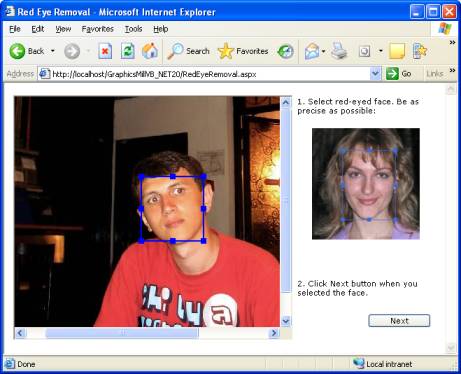
### Step 1
 
On the first step the user selects a face. Also, they get back to this step when they complete red-eye removal to remove red-eye effect on another face (if available).
 
For clarity, each element of the user interface is labeled with a brief comment. Since accuracy of face selection matters, an image demonstrating how to select face properly is placed there too.
 
The first step looks as follows:
 ![Red-eye removal wizard: step 1. Face selection.](https://www.graphicsmill.com/docs/gm5/RedEyeRemovalWizard_Web_Step1.jpg) 
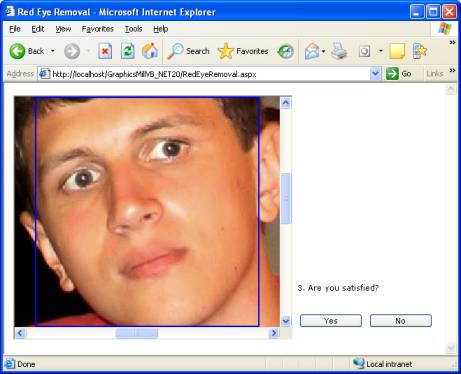
### Step 2
 
While switching between step 1 and 2, semiautomatic red-eye removal algorithm is applied. On this step the user should specify whether algorithm worked as expected or not. To make it easier to see the result, the image is zoomed to enlarge the selected face to size of the control.
 
If the result is fine, the user clicks **Yes** button. After that they get returned back to the step 1 where they can select one more face to fix.
 
If the algorithm mistakes, the user clicks **No**. In this case they are moved to the next step where manual red-eye removal can be applied.
 
The second steps looks as follows:
 ![Red-eye removal wizard: step 2. Semiautomatic result confirmation.](https://www.graphicsmill.com/docs/gm5/RedEyeRemovalWizard_Web_Step2.jpg) 
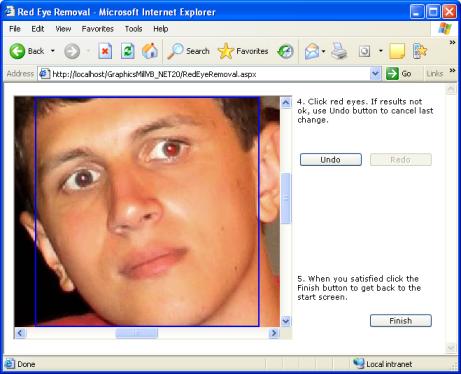
### Step 3
 
On the third step the user can remove red-eye effect manually. To do that they should click red-eyed areas. To make it easier to click the eye accurately, the face is also zoomed here.
 
If the algorithm "fixed" the image incorrectly (e.g. if the user clicked outside of an eye or if the algorithm captured too many colors), the user can revert to the previous state by clicking **Undo** button. They can also use **Redo** button to re-apply this change.
 
When the user is satisfied with the result, they click the **Finish** button which leads them to the step 1. They can repeat these operations for another face.
 
The third step looks as follows:
 ![Red-eye removal wizard: step 3. Manual red-eye removal.](https://www.graphicsmill.com/docs/gm5/RedEyeRemovalWizard_Web_Step3.jpg)
 
## See Also
  
### Manual
 
- [Semiautomatic Red-Eye Removal](https://www.graphicsmill.com/docs/gm5/SemiautomaticRedEyeRemoval.htm.md)
- [Manual Red-Eye Removal](https://www.graphicsmill.com/docs/gm5/ManualRedEyeRemoval.htm.md)
- [Remote Scripting Approach (AJAX Controls)](https://www.graphicsmill.com/docs/gm5/AjaxControlsRemoteScripting.htm.md)
- [Client-Side Control Scripting in AJAX Controls](https://www.graphicsmill.com/docs/gm5/AjaxControlsClientSideScripting.htm.md)
- [Using Navigators and Rubberbands (AJAX Controls)](https://www.graphicsmill.com/docs/gm5/AjaxControlsUsingNavigatorsandRubberbands.htm.md)
