---
title: "Cropping Photos Using Client-Side Scripting (Web Controls)"
canonical: https://www.graphicsmill.com/docs/gm5/CroppingPhotosUsingClientSideScripting.htm
product: "Graphics Mill 5.5 for .NET"
---

This documentation is for the old version. [Go to the latest Graphics Mill docs](https://www.graphicsmill.com/docs/gm/)

# Cropping Photos Using Client-Side Scripting (Web Controls)
 
One of the benefits of the Graphics Mill for .NET is that it contains not only a server-side component. It also contains a web control which enables you to create convenient and highly interactive user interface.
 
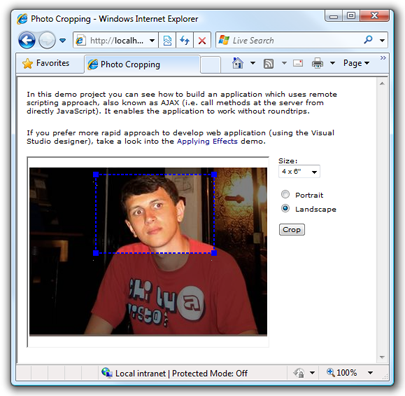
This code example demonstrates how to use this control to build an application which allows the user to prepare a photo before ordering it for printing. This application allows the user to crop the photo to fit necessary proportions and specify orientation. It also checks whether the image dimensions allow printing in the specified size. It displays a warning, if after cropping the image will be too small to provide enough quality, .
 
The screenshot of this application you can see below.
 
![Photo cropping screenshot](https://www.graphicsmill.com/docs/gm5/PhotoCroppingWebForms.png)
 
The important feature of this application is that it utilizes AJAX technique to communicate with server. It does not require any roundtrips when the user changes format, orientation, etc. Even when the Crop button is clicked, the page is not refreshed. Only the image inside the control is updated. It is achieved by using the [client-side scripting](https://www.graphicsmill.com/docs/gm5/EnchancingInteractivitywithClientSideScripting.htm.md) object model of this web control.
 
Here is a code example:
 
```
<%@ Page language="VB" AutoEventWireup="false" %>
<%@ Register TagPrefix="aur" Namespace="Aurigma.GraphicsMill.WebControls" Assembly="Aurigma.GraphicsMill.WebControls" %>
<script runat="server" language="VB">
Private Sub Page_Load(ByVal sender As System.Object, ByVal e As System.EventArgs) Handles MyBase.LoadIf Not Page.IsPostBack Then	BitmapViewer1.Bitmap.Load(Server.MapPath("SourceImages/Mountain.jpg"))		'Set rectangle for landscape 4 x 6" format	Dim ratio As Single = 4 / 6	RectangleRubberband1.Ratio = ratio
	If BitmapViewer1.Bitmap.Height >= BitmapViewer1.Bitmap.Width * ratio Then		Dim height As Integer = Math.Round(BitmapViewer1.Bitmap.Width * ratio)		RectangleRubberband1.Rectangle = New System.Drawing.Rectangle( _			0, (BitmapViewer1.Bitmap.Height - height) \ 2, BitmapViewer1.Bitmap.Width, height)	Else		Dim width As Integer = Math.Round(BitmapViewer1.Bitmap.Height / ratio)		RectangleRubberband1.Rectangle = New System.Drawing.Rectangle( _			(BitmapViewer1.Bitmap.Width - width) \ 2, 0, width, BitmapViewer1.Bitmap.Height)	End If		End If
End Sub

<RemoteScriptingMethod> _
Public Sub Crop(top As Integer, left As Integer, width As Integer, height As Integer)BitmapViewer1.Bitmap.Transforms.Crop(top, left, width, height)
End Sub
</script>
<!DOCTYPE HTML PUBLIC "-//W3C//DTD HTML 4.0 Transitional//EN" >
<html><head>	<title>Photo Cropping</title>	<link href="Style.css" type="text/css" rel="stylesheet">		<script language="javascript">
var isLandscape = true;
var bitmapViewer1, rectangleRubberband1;
var format = new Array(6, 4);
var dpi = 30;
var updateRectangle = false;

function SelectFormat_change(orientationChanged){var bitmapWidth = bitmapViewer1.bitmap.getWidth();var bitmapHeight = bitmapViewer1.bitmap.getHeight();	var rectangle = rectangleRubberband1.getRectangle();var SelectFormat = document.getElementById("SelectFormat");format = SelectFormat.options[SelectFormat.selectedIndex].value.split(",");var ratio;if (isLandscape){	ratio = format[1] / format[0];}else{	ratio = format[0] / format[1];	}//Set rectangle ratiorectangleRubberband1.setRatio(ratio);//Change size of rectangleif (orientationChanged){	z = rectangle.width;	rectangle.width = rectangle.height;	rectangle.height = z;}else{	if (ratio < 0){		rectangle.height = Math.floor(rectangle.width * ratio);	}	else{		rectangle.width = Math.floor(rectangle.height / ratio);	}}//Change size of rectangleif (rectangle.top + rectangle.height > bitmapHeight){	rectangle.height = bitmapHeight - rectangle.top;	rectangle.width = Math.floor(rectangle.height / ratio);}if (rectangle.left + rectangle.width > bitmapWidth){	rectangle.width = bitmapWidth - rectangle.left;	rectangle.height = Math.floor(rectangle.width * ratio);}	//Set rectanglerectangleRubberband1.setRectangle(rectangle);
checkResolution();
}

function RadioOrientation_click(){isLandscape = document.getElementById("RadioLandscape").checked;SelectFormat_change(true);
}

function ButtonCrop_click(){if (bitmapViewer1.getStatus() != "Busy"){	//Process cropping via remote scripting	var r=rectangleRubberband1.getRectangle();	if (r.width < 1 || r.height < 1){		return;	}
        bitmapViewer1.invokeRemoteMethod("Crop", new Array(r.left, r.top, r.width, r.height));
	updateRectangle=true;}else{	alert("Please wait until previous operation will be completed.");}
}

function bitmapViewer1_StatusChanged(){var s = bitmapViewer1.getStatus();document.getElementById("SpanStatus").innerHTML = s;	document.getElementById("ButtonCrop").disabled = (s == "Busy");
if (updateRectangle && s != "Busy"){	updateRectangle = false;	rectangleRubberband1.setRectangle(new Rectangle(0, 0, bitmapViewer1.bitmap.getWidth(), bitmapViewer1.bitmap.getHeight()))}
}

function rectangleRubberband1_RectangleChanging(){checkResolution();
}

function checkResolution(){var r = rectangleRubberband1.getRectangle();	var minWidth = (isLandscape ? format[0] : format[1]) * dpi;	var badQuality = (r.width < minWidth);var c= badQuality ? "#FF0000" : "#0000FF";document.getElementById("SpanWarning").style.display = badQuality ? "block" : "none";if (rectangleRubberband1.getOutlineColor() != c){	rectangleRubberband1.setOutlineColor(c);}
}

function initPage(){bitmapViewer1 = document.getElementById("<%=BitmapViewer1.ClientID%>");bitmapViewer1.addStatusChanged(bitmapViewer1_StatusChanged);rectangleRubberband1 = document.getElementById("<%=RectangleRubberband1.ClientID%>");rectangleRubberband1.addRectangleChanging(rectangleRubberband1_RectangleChanging);checkResolution();
}		</script></head><body onload="initPage();">	<form id="Form1" runat="server">		<table>			<tr>				<td valign="top">					<aur:BitmapViewer ID="BitmapViewer1" runat="server" Width="344" Height="270" Rubberband="RectangleRubberband1"						BorderWidth="2" BorderStyle="Inset" ScrollBarsStyle="Auto" BackColor="White"></aur:BitmapViewer>				</td>				<td>					&nbsp;				</td>				<td valign="top" width="100">					Size:					<br>					<select id="SelectFormat" onchange="SelectFormat_change(false);">						<option value="6,4" selected>4 x 6"</option>						<option value="7,5">5 x 7"</option>						<option value="10,8">8 x 10"</option>					</select>					<br>					<br>					<label for="RadioPortrait">					<input id="RadioPortrait" onclick="RadioOrientation_click();" type="radio" name="Orientation">&nbsp;Portrait</label>					<br>					<label for="RadioLandscape">					<input id="RadioLandscape" onclick="RadioOrientation_click();" type="radio" checked name="Orientation">&nbsp;Landscape</label>					<br>					<br>					<input id="ButtonCrop" onclick="ButtonCrop_click();" type="button" value="Crop">					<br>					<br>					<span id="SpanStatus"></span>					<br>					<br>					<span id="SpanWarning" style="display: none; font-weight: bold; color: red">Selected					area is too small to get good quality of prints. </span>				</td>			</tr>		</table>		<aur:RectangleRubberband ID="RectangleRubberband1" runat="server" ResizeMode="Proportional" GripsVisible="True"			MaskVisible="True"></aur:RectangleRubberband>	</form></body>
</html>
```
 
```csharp
<%@ Page Language="C#" AutoEventWireup="true" %>
<%@ Register TagPrefix="aur" Namespace="Aurigma.GraphicsMill.WebControls" Assembly="Aurigma.GraphicsMill.WebControls" %>
<script runat="server" language="C#">   
private void Page_Load(System.Object sender, System.EventArgs e)
{if (!Page.IsPostBack){	BitmapViewer1.Bitmap.Load(Server.MapPath("SourceImages/Mountain.jpg"));
	//Set rectangle for landscape 4 x 6" format	float ratio = 4f / 6f;	RectangleRubberband1.Ratio = ratio;
	if (BitmapViewer1.Bitmap.Height >= BitmapViewer1.Bitmap.Width * ratio)	{		int height = (int)Math.Round(BitmapViewer1.Bitmap.Width * ratio);		RectangleRubberband1.Rectangle = new System.Drawing.Rectangle(			0, (BitmapViewer1.Bitmap.Height - height) / 2, BitmapViewer1.Bitmap.Width, height);	}	else	{		int width = (int)Math.Round(BitmapViewer1.Bitmap.Height / ratio);		RectangleRubberband1.Rectangle = new System.Drawing.Rectangle(			(BitmapViewer1.Bitmap.Width - width) / 2, 0, width, BitmapViewer1.Bitmap.Height);	}				}
}

[RemoteScriptingMethod]
public void Crop(int top, int left, int width, int height)
{BitmapViewer1.Bitmap.Transforms.Crop(top, left, width, height);
}
</script>
<!DOCTYPE HTML PUBLIC "-//W3C//DTD HTML 4.0 Transitional//EN" >
<html><head>	<title>Photo Cropping</title>	<link href="Style.css" type="text/css" rel="stylesheet">		<script language="javascript">
var isLandscape = true;
var bitmapViewer1, rectangleRubberband1;
var format = new Array(6, 4);
var dpi = 30;
var updateRectangle = false;

function SelectFormat_change(orientationChanged){var bitmapWidth = bitmapViewer1.bitmap.getWidth();var bitmapHeight = bitmapViewer1.bitmap.getHeight();	var rectangle = rectangleRubberband1.getRectangle();var SelectFormat = document.getElementById("SelectFormat");format = SelectFormat.options[SelectFormat.selectedIndex].value.split(",");var ratio;if (isLandscape){	ratio = format[1] / format[0];}else{	ratio = format[0] / format[1];	}//Set rectangle ratiorectangleRubberband1.setRatio(ratio);//Change size of rectangleif (orientationChanged){	z = rectangle.width;	rectangle.width = rectangle.height;	rectangle.height = z;}else{	if (ratio < 0){		rectangle.height = Math.floor(rectangle.width * ratio);	}	else{		rectangle.width = Math.floor(rectangle.height / ratio);	}}//Change size of rectangleif (rectangle.top + rectangle.height > bitmapHeight){	rectangle.height = bitmapHeight - rectangle.top;	rectangle.width = Math.floor(rectangle.height / ratio);}if (rectangle.left + rectangle.width > bitmapWidth){	rectangle.width = bitmapWidth - rectangle.left;	rectangle.height = Math.floor(rectangle.width * ratio);}	//Set rectanglerectangleRubberband1.setRectangle(rectangle);
checkResolution();
}

function RadioOrientation_click(){isLandscape = document.getElementById("RadioLandscape").checked;SelectFormat_change(true);
}

function ButtonCrop_click(){if (bitmapViewer1.getStatus() != "Busy"){	//Process cropping via remote scripting	var r=rectangleRubberband1.getRectangle();	if (r.width < 1 || r.height < 1){		return;	}
        bitmapViewer1.invokeRemoteMethod("Crop", new Array(r.left, r.top, r.width, r.height));
	updateRectangle=true;}else{	alert("Please wait until previous operation will be completed.");}
}

function bitmapViewer1_StatusChanged(){var s = bitmapViewer1.getStatus();document.getElementById("SpanStatus").innerHTML = s;	document.getElementById("ButtonCrop").disabled = (s == "Busy");
if (updateRectangle && s != "Busy"){	updateRectangle = false;	rectangleRubberband1.setRectangle(new Rectangle(0, 0, bitmapViewer1.bitmap.getWidth(), bitmapViewer1.bitmap.getHeight()))}
}

function rectangleRubberband1_RectangleChanging(){checkResolution();
}

function checkResolution(){var r = rectangleRubberband1.getRectangle();	var minWidth = (isLandscape ? format[0] : format[1]) * dpi;	var badQuality = (r.width < minWidth);var c= badQuality ? "#FF0000" : "#0000FF";document.getElementById("SpanWarning").style.display = badQuality ? "block" : "none";if (rectangleRubberband1.getOutlineColor() != c){	rectangleRubberband1.setOutlineColor(c);}
}

function initPage(){bitmapViewer1 = document.getElementById("<%=BitmapViewer1.ClientID%>");bitmapViewer1.addStatusChanged(bitmapViewer1_StatusChanged);rectangleRubberband1 = document.getElementById("<%=RectangleRubberband1.ClientID%>");rectangleRubberband1.addRectangleChanging(rectangleRubberband1_RectangleChanging);checkResolution();
}		</script></head><body onload="initPage();">	<form id="Form1" runat="server">		<table>			<tr>				<td valign="top">					<aur:BitmapViewer ID="BitmapViewer1" runat="server" Width="344" Height="270" Rubberband="RectangleRubberband1"						BorderWidth="2" BorderStyle="Inset" ScrollBarsStyle="Auto" BackColor="White"></aur:BitmapViewer>				</td>				<td>					&nbsp;				</td>				<td valign="top" width="100">					Size:					<br>					<select id="SelectFormat" onchange="SelectFormat_change(false);">						<option value="6,4" selected>4 x 6"</option>						<option value="7,5">5 x 7"</option>						<option value="10,8">8 x 10"</option>					</select>					<br>					<br>					<label for="RadioPortrait">					<input id="RadioPortrait" onclick="RadioOrientation_click();" type="radio" name="Orientation">&nbsp;Portrait</label>					<br>					<label for="RadioLandscape">					<input id="RadioLandscape" onclick="RadioOrientation_click();" type="radio" checked name="Orientation">&nbsp;Landscape</label>					<br>					<br>					<input id="ButtonCrop" onclick="ButtonCrop_click();" type="button" value="Crop">					<br>					<br>					<span id="SpanStatus"></span>					<br>					<br>					<span id="SpanWarning" style="display: none; font-weight: bold; color: red">Selected					area is too small to get good quality of prints. </span>				</td>			</tr>		</table>		<aur:RectangleRubberband ID="RectangleRubberband1" runat="server" ResizeMode="Proportional" GripsVisible="True"			MaskVisible="True"></aur:RectangleRubberband>	</form></body>
</html>
```
