---
title: "Measuring Text Size"
canonical: https://www.graphicsmill.com/docs/gm5/MeasuringTextSize.htm
product: "Graphics Mill 5.5 for .NET"
---
This documentation is for the old version. [Go to the latest Graphics Mill docs](https://www.graphicsmill.com/docs/gm/)
# Measuring Text Size
When we draw text combined with graphics, it is very important to be able to measure text size taking into account font settings. This topic describes how to get an extent of single-line and multiline text using Graphics Mill for .NET.
- Measuring Single-line Text Size
- Measuring Multiline Text Size
- Measuring Formatted Text Size
## Measuring Single-line Text Size
Measuring the extent of the text string drawn by the [GdiGraphics.DrawString](https://www.graphicsmill.com/docs/gm5/O_T_Aurigma_GraphicsMill_Drawing_GdiGraphics_DrawString.htm.md) method with Graphics Mill for .NET is very easy. Just specify font name, size and other settings in the [Font](https://www.graphicsmill.com/docs/gm5/T_Aurigma_GraphicsMill_Drawing_Font.htm.md) class and use [Font.MeasureString(String)](https://www.graphicsmill.com/docs/gm5/M_Aurigma_GraphicsMill_Drawing_Font_MeasureString_1_bb3a7a4f.htm.md) method to get string width and height. This figure:

can be produced with following code:
```
' Create Bitmap object.
Dim bitmap As New Aurigma.GraphicsMill.Bitmap(250, 40, Aurigma.GraphicsMill.PixelFormat.Format24bppRgb)
bitmap.Unit = Aurigma.GraphicsMill.Unit.Point
Dim graphics As Aurigma.GraphicsMill.Drawing.GdiGraphics = bitmap.GetGdiGraphics()
' Fill background.
graphics.FillRectangle(New Aurigma.GraphicsMill.Drawing.SolidBrush( _
Aurigma.GraphicsMill.RgbColor.White), 0, 0, bitmap.Width, bitmap.Height)
' Adjust font settings.
Dim timesFont As New Aurigma.GraphicsMill.Drawing.Font("Times New Roman", 25, False, True)
Dim text As String = "Single-line text..."
' Measure the text size.
Dim size As System.Drawing.SizeF = timesFont.MeasureString(text)
Dim blackBrush As New Aurigma.GraphicsMill.Drawing.SolidBrush(Aurigma.GraphicsMill.RgbColor.Black)
graphics.DrawString(text, timesFont, blackBrush, 0, 0)
Dim redBrush As New Aurigma.GraphicsMill.Drawing.SolidBrush(Aurigma.GraphicsMill.RgbColor.Red)
Dim tahomaFont As New Aurigma.GraphicsMill.Drawing.Font("Tahoma", 12)
text = "Height: " & size.Height
graphics.DrawString(text, tahomaFont, redBrush, size.Width + 1, 20)
text = "Width: " & size.Width
graphics.DrawString(text, tahomaFont, redBrush, size.Width + 1, 0)
```
```csharp
// Create Bitmap object.
Aurigma.GraphicsMill.Bitmap bitmap =
new Aurigma.GraphicsMill.Bitmap(250, 40, Aurigma.GraphicsMill.PixelFormat.Format24bppRgb);
bitmap.Unit = Aurigma.GraphicsMill.Unit.Point;
Aurigma.GraphicsMill.Drawing.GdiGraphics graphics = bitmap.GetGdiGraphics();
// Fill background.
graphics.FillRectangle(new Aurigma.GraphicsMill.Drawing.SolidBrush(
Aurigma.GraphicsMill.RgbColor.White), 0, 0, bitmap.Width, bitmap.Height);
// Adjust font settings.
Aurigma.GraphicsMill.Drawing.Font timesFont =
new Aurigma.GraphicsMill.Drawing.Font("Times New Roman", 25, false, true);
string text = "Single-line text...";
// Measure the text size.
System.Drawing.SizeF size = timesFont.MeasureString(text);
Aurigma.GraphicsMill.Drawing.SolidBrush blackBrush =
new Aurigma.GraphicsMill.Drawing.SolidBrush(Aurigma.GraphicsMill.RgbColor.Black);
graphics.DrawString(text, timesFont, blackBrush, 0, 0);
Aurigma.GraphicsMill.Drawing.SolidBrush redBrush =
new Aurigma.GraphicsMill.Drawing.SolidBrush(Aurigma.GraphicsMill.RgbColor.Red);
Aurigma.GraphicsMill.Drawing.Font tahomaFont = new
Aurigma.GraphicsMill.Drawing.Font("Tahoma", 12);
text = "Height: " + size.Height.ToString();
graphics.DrawString(text, tahomaFont, redBrush, size.Width + 1, 20);
text = "Width: " + size.Width.ToString();
graphics.DrawString(text, tahomaFont, redBrush, size.Width + 1, 0);
```
## Measuring Multiline Text Size
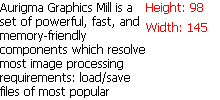
Graphics Mill for .NET provides the [GdiGraphics.DrawText](https://www.graphicsmill.com/docs/gm5/O_T_Aurigma_GraphicsMill_Drawing_GdiGraphics_DrawText.htm.md) method to draw single-style multiline text. To measure this text extent you can use the [Font.MeasureText](https://www.graphicsmill.com/docs/gm5/O_T_Aurigma_GraphicsMill_Drawing_Font_MeasureText.htm.md) method. This method accepts the following parameters:
- Multiline text you want to measure.
- Width of the destination rectangle.
- Height of the destination rectangle.
- Value specifying whether to take into account the destination rectangle. If this value is `false` the whole text is processed. Otherwise, only the part which fits into the destination rectangle is measured.
- Number of whitespaces to replace one tabulation character in the text with.
To get a valid text size, parameters values passed to this method should be identical to the respective parameters of the GdiGraphics.DrawText method.
The code example below draws the following figure:
```
' Create Bitmap object.
Dim bitmap As New Aurigma.GraphicsMill.Bitmap(220, 100, Aurigma.GraphicsMill.PixelFormat.Format24bppRgb)
bitmap.Unit = Aurigma.GraphicsMill.Unit.Point
Dim graphics As Aurigma.GraphicsMill.Drawing.GdiGraphics = bitmap.GetGdiGraphics()
' Fill background.
graphics.FillRectangle(New Aurigma.GraphicsMill.Drawing.SolidBrush( _
Aurigma.GraphicsMill.RgbColor.White), 0, 0, bitmap.Width, bitmap.Height)
' Adjust font settings.
Dim font As New Aurigma.GraphicsMill.Drawing.Font("Tahoma", 12)
Dim rect As New System.Drawing.RectangleF(0, 0, 150, 100)
Dim text As String = "Aurigma Graphics Mill is a set of powerful, fast, and " & _
"memory-friendly components which resolve most image processing requirements: " & _
"load/save files of most popular formats, enhance, transform, display, " & _
"reduce colors, combine images, draw imagery, etc."
' Measure the text size.
Dim size As System.Drawing.SizeF = font.MeasureText(text, rect.Width, rect.Height, True, 0)
Dim blackBrush As New Aurigma.GraphicsMill.Drawing.SolidBrush(Aurigma.GraphicsMill.RgbColor.Black)
graphics.DrawText(text, font, blackBrush, rect, True, 0)
Dim redBrush As New Aurigma.GraphicsMill.Drawing.SolidBrush(Aurigma.GraphicsMill.RgbColor.Red)
text = "Height: " & size.Height
graphics.DrawString(text, font, redBrush, size.Width + 1, 0)
text = "Width: " & size.Width
graphics.DrawString(text, font, redBrush, size.Width + 1, 20)
```
```csharp
// Create Bitmap object.
Aurigma.GraphicsMill.Bitmap bitmap =
new Aurigma.GraphicsMill.Bitmap(220, 100, Aurigma.GraphicsMill.PixelFormat.Format24bppRgb);
bitmap.Unit = Aurigma.GraphicsMill.Unit.Point;
Aurigma.GraphicsMill.Drawing.GdiGraphics graphics = bitmap.GetGdiGraphics();
// Fill background.
graphics.FillRectangle(new Aurigma.GraphicsMill.Drawing.SolidBrush(
Aurigma.GraphicsMill.RgbColor.White), 0, 0, bitmap.Width, bitmap.Height);
// Adjust font settings.
Aurigma.GraphicsMill.Drawing.Font font =
new Aurigma.GraphicsMill.Drawing.Font("Tahoma", 12);
System.Drawing.RectangleF rect = new System.Drawing.RectangleF(0, 0, 150, 100);
string text = "Aurigma Graphics Mill is a set of powerful, fast, and " +
"memory-friendly components which resolve most image processing requirements: " +
"load/save files of most popular formats, enhance, transform, display, " +
"reduce colors, combine images, draw imagery, etc.";
// Measure the text size.
System.Drawing.SizeF size = font.MeasureText(text, rect.Width, rect.Height, true, 0);
Aurigma.GraphicsMill.Drawing.SolidBrush blackBrush =
new Aurigma.GraphicsMill.Drawing.SolidBrush(Aurigma.GraphicsMill.RgbColor.Black);
graphics.DrawText(text, font, blackBrush, rect, true, 0);
Aurigma.GraphicsMill.Drawing.SolidBrush redBrush =
new Aurigma.GraphicsMill.Drawing.SolidBrush(Aurigma.GraphicsMill.RgbColor.Red);
text = "Height: " + size.Height.ToString();
graphics.DrawString(text, font, redBrush, size.Width + 1, 0);
text = "Width: " + size.Width.ToString();
graphics.DrawString(text, font, redBrush, size.Width + 1, 20);
```
## Measuring Formatted Text Size
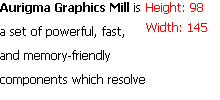
One more kind of the multiline text is the formatted text. To draw and measure such text, Graphics Mill for .NET provides [GdiGraphics.DrawFormattedText](https://www.graphicsmill.com/docs/gm5/O_T_Aurigma_GraphicsMill_Drawing_GdiGraphics_DrawFormattedText.htm.md) and [Font.MeasureFormattedText](https://www.graphicsmill.com/docs/gm5/O_T_Aurigma_GraphicsMill_Drawing_Font_MeasureFormattedText.htm.md) methods, respectively. Both these methods are similar to corresponding ones intended for single-style text. Similar to Font.MeasureText, the Font.MeasureFormattedText method should accept the same arguments as the GdiGraphics.DrawFormattedText.
The figure below can be drawn using the following code sample:
```
' Create Bitmap object.
Dim bitmap As New Aurigma.GraphicsMill.Bitmap(220, 100, Aurigma.GraphicsMill.PixelFormat.Format24bppRgb)
bitmap.Unit = Aurigma.GraphicsMill.Unit.Point
Dim graphics As Aurigma.GraphicsMill.Drawing.GdiGraphics = bitmap.GetGdiGraphics()
' Fill background.
graphics.FillRectangle(New Aurigma.GraphicsMill.Drawing.SolidBrush( _
Aurigma.GraphicsMill.RgbColor.White), 0, 0, bitmap.Width, bitmap.Height)
' Adjust font settings.
Dim font As New Aurigma.GraphicsMill.Drawing.Font("Tahoma", 12)
Dim rect As New System.Drawing.RectangleF(0, 0, 150, 100)
Dim text As String = "" & _
"Aurigma Graphics Mill is a set of powerful, fast, and memory-friendly components " & _
"which resolve most image processing requirements: load/save files of most popular formats, " & _
"enhance, transform, display, reduce colors, combine images, draw imagery, etc."
' Measure the text size.
Dim size As System.Drawing.SizeF = font.MeasureFormattedText(text, rect.Width, rect.Height, True, 0)
Dim blackBrush As New Aurigma.GraphicsMill.Drawing.SolidBrush(Aurigma.GraphicsMill.RgbColor.Black)
graphics.DrawFormattedText(text, font, blackBrush, rect, True, 0)
Dim redBrush As New Aurigma.GraphicsMill.Drawing.SolidBrush(Aurigma.GraphicsMill.RgbColor.Red)
text = "Height: " & size.Height
graphics.DrawString(text, font, redBrush, size.Width + 1, 0)
text = "Width: " & size.Width
graphics.DrawString(text, font, redBrush, size.Width + 1, 20)
```
```csharp
// Create Bitmap object.
Aurigma.GraphicsMill.Bitmap bitmap =
new Aurigma.GraphicsMill.Bitmap(220, 100, Aurigma.GraphicsMill.PixelFormat.Format24bppRgb);
bitmap.Unit = Aurigma.GraphicsMill.Unit.Point;
Aurigma.GraphicsMill.Drawing.GdiGraphics graphics = bitmap.GetGdiGraphics();
// Fill background.
graphics.FillRectangle(new Aurigma.GraphicsMill.Drawing.SolidBrush(
Aurigma.GraphicsMill.RgbColor.White), 0, 0, bitmap.Width, bitmap.Height);
// Adjust font settings.
Aurigma.GraphicsMill.Drawing.Font font =
new Aurigma.GraphicsMill.Drawing.Font("Tahoma", 12);
System.Drawing.RectangleF rect = new System.Drawing.RectangleF(0, 0, 150, 100);
string text = "" +
"Aurigma Graphics Mill is a set of powerful, fast, and memory-friendly components " +
"which resolve most image processing requirements: load/save files of most popular formats, " +
"enhance, transform, display, reduce colors, combine images, draw imagery, etc.";
// Measure the text size.
System.Drawing.SizeF size = font.MeasureFormattedText(text, rect.Width, rect.Height, true, 0);
Aurigma.GraphicsMill.Drawing.SolidBrush blackBrush =
new Aurigma.GraphicsMill.Drawing.SolidBrush(Aurigma.GraphicsMill.RgbColor.Black);
graphics.DrawFormattedText(text, font, blackBrush, rect, true, 0);
Aurigma.GraphicsMill.Drawing.SolidBrush redBrush =
new Aurigma.GraphicsMill.Drawing.SolidBrush(Aurigma.GraphicsMill.RgbColor.Red);
text = "Height: " + size.Height.ToString();
graphics.DrawString(text, font, redBrush, size.Width + 1, 0);
text = "Width: " + size.Width.ToString();
graphics.DrawString(text, font, redBrush, size.Width + 1, 20);
```
## See Also
### Reference
- [Font Class](https://www.graphicsmill.com/docs/gm5/T_Aurigma_GraphicsMill_Drawing_Font.htm.md)
- [GdiGraphics Class](https://www.graphicsmill.com/docs/gm5/T_Aurigma_GraphicsMill_Drawing_GdiGraphics.htm.md)
- [GdiGraphics.DrawString Overload](https://www.graphicsmill.com/docs/gm5/O_T_Aurigma_GraphicsMill_Drawing_GdiGraphics_DrawString.htm.md)
- [GdiGraphics.DrawText Overload](https://www.graphicsmill.com/docs/gm5/O_T_Aurigma_GraphicsMill_Drawing_GdiGraphics_DrawText.htm.md)
- [GdiGraphics.DrawFormattedText Overload](https://www.graphicsmill.com/docs/gm5/O_T_Aurigma_GraphicsMill_Drawing_GdiGraphics_DrawFormattedText.htm.md)
- [Font.MeasureString(String) Method](https://www.graphicsmill.com/docs/gm5/M_Aurigma_GraphicsMill_Drawing_Font_MeasureString_1_bb3a7a4f.htm.md)
- [Font.MeasureText Overload](https://www.graphicsmill.com/docs/gm5/O_T_Aurigma_GraphicsMill_Drawing_Font_MeasureText.htm.md)
- [Font.MeasureFormattedText Overload](https://www.graphicsmill.com/docs/gm5/O_T_Aurigma_GraphicsMill_Drawing_Font_MeasureFormattedText.htm.md)
### Manual
- [Drawing Text String](https://www.graphicsmill.com/docs/gm5/DrawingTextString.htm.md)
- [Drawing Multiline Text](https://www.graphicsmill.com/docs/gm5/DrawingMultilineText.htm.md)
- [Drawing Formatted Text](https://www.graphicsmill.com/docs/gm5/DrawingFormattedText.htm.md)
- [Measuring Characters Positions](https://www.graphicsmill.com/docs/gm5/MeasuringCharactersPositions.htm.md)