Reuse product clipping paths across print and web

A retoucher has already traced the product in your master photo. The catalog designer needs that exact outline. The storefront needs the same product on a transparent background. Use the Graphics Mill .NET SDK in your DAM or PIM integration to produce both files from the approved cutout.

One product outline, two different files

A JPEG can look right on screen even after an export has dropped its clipping path. These examples use an apple with an embedded outline. Each checks a different deliverable.

A reusable path for catalog layouts

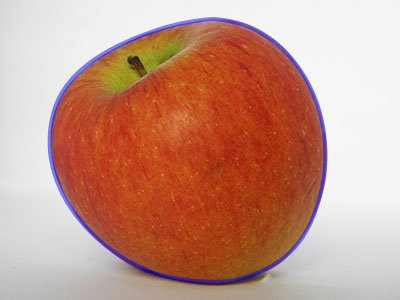
A blue outline traces the edge of a red apple in the sample JPEG.
The sample draws the clipping path in blue so its position can be inspected against the pixels.

For a JPEG or TIFF destined for page layout, the curve needs to travel with the pixels. The visualization sample reads the stored path and draws it in blue for inspection. The crop sample shows how to carry the Adobe image resources into a new JPEG as the frame changes.
A transparent PNG for the storefront

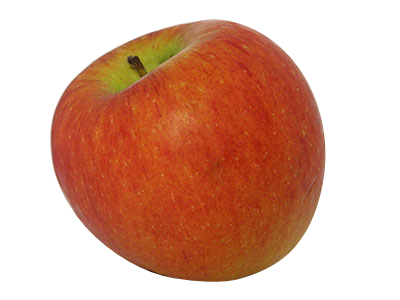
Red apple isolated from the studio background by its saved clipping path.
In the PNG, pixels outside the saved path are transparent. The blue behind the apple is the page background.

The storefront can place this PNG on its own background. The sample reads the first path in the JPEG, fills it as a grayscale mask and applies the mask to the image’s alpha channel. It uses the outline already supplied by the retoucher.

What else does the receiving channel require?

Start with the receiving team’s file specification. A web catalog, a retail partner and a brand portal can each need a different rendition of the same master.

Web color from a print master

Convert CMYK pixels to sRGB for a web JPEG. Use the master’s embedded ICC profile when available. For an untagged file, the C# example supplies a source profile explicitly. Confirm that assumption with the team that supplied the master.

Credits and keywords for a partner

Agree which embedded fields the partner expects in its download. The JPEG example resizes the image and explicitly writes EXIF, IPTC, XMP and Adobe resources. Reopen the exported file to check the required credit or keyword.

Previews for a brand portal

Let users recognize an asset before downloading its master. One sample branches a JPEG into 128- and 640-pixel previews. For a brand guide supplied as PDF, a separate sample renders its first page as an image.

Where the SDK fits in your DAM

Your platform selects the approved asset version, the product it belongs to and the delivery rules. Your .NET service reads the master, runs the required image operations and writes the channel file. Your integration then associates that result with the right asset version. This is a useful place for custom processing when a standard export loses an outline or a partner requires specific embedded fields.

Test the file your team still fixes by hand

Take a supplier JPEG or TIFF with a known clipping path and the channel specification that gives you trouble. For print, reopen the cropped file in your layout tool and check the outline. For web, place the PNG on a contrasting background and inspect the edge. Check the delivered profile and credit against the master.