Build print PDFs from your layouts and artwork

A photo book can start as page coordinates in your database. An invitation run can start as a finished PDF. With the Graphics Mill .NET SDK, your production application can draw a page from scratch, compose existing artwork or personalize a layered Photoshop template. The job determines which route to use.

Choose where the layout comes from

These three C# examples produce printable documents from different inputs. Open the code to see what the application supplies and inspect the resulting file.

Draw from your own data

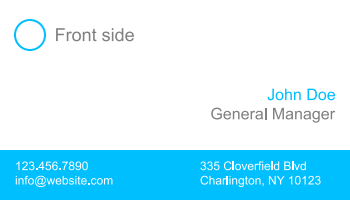
Front of the card drawn in C#, with John Doe above a cyan band of contact details.
The sample draws both sides. The front combines text, a circle and a cyan rectangle.

Keep the layout in your application. If you store it as JSON, your code reads the fields and maps them to page sizes, positions and drawing calls. In this example, PdfWriter starts with two blank pages. The code draws the type and geometry on each side.

Build on an existing PDF

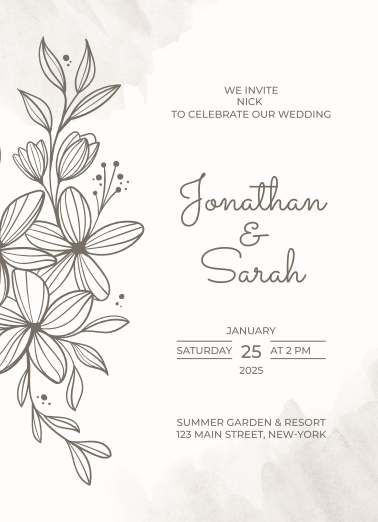
Invitation with the guest name Nick printed above Jonathan and Sarah on the floral background.
Page one of the output PDF carries Nick’s name on the original invitation artwork.

Keep approved artwork as the page background. The invitation sample reads one PDF page into a graphics container, draws it on each new page and places a different guest name over it. The output is one three-page document.

Personalize a layered PSD

Business card preview with the blue name field reading TYPE YOUR NAME.
Output preview from Update Text. The Name layer now reads “TYPE YOUR NAME”.

When a designer owns the master in Photoshop, keep its layers as the starting point. The PSD sample matches the text frame named Name, replaces its contents and renders the business card to PDF.

What will your print application produce?

A single job can combine drawing instructions, raster images and pages from other files. Here are three ways to use those operations.

Photo books from saved projects

Read the page order, photo crops and captions from your editor’s project file. Your application interprets that format, positions each image and draws the caption. Add a PDF page for each spread in the project.

Booklets from supplied PDFs

Assemble a cover, a product sheet and a terms page in the order the customer selected. The merge example reads pages from several PDFs and draws each into a new document, retaining each source page’s size and resolution.

Retail signs from catalog records

Use the same sign layout across a store. Place a product photo, draw the price and description from the SKU record, and position an SVG brand mark. When a price changes, render the affected sign again from the updated record.

Match the PDF to the press specification

A preview shows where the artwork lands. For press delivery, check the page boxes and output intent against the job ticket. The page-box example sets trim and bleed boundaries. The PDF/X-4 example sets a CMYK output intent and uses the ICC profile to convert an image for that printing condition.

Try one job from your print queue

Bring a saved layout, a supplied PDF or a PSD master, along with two different order records. Render both jobs. Compare the text, artwork placement and page dimensions, then have prepress check the output against the job ticket.