Drawing Shapes
Drawing functionality described in this topic is out of date. If you want to learn how to draw graphic shapes using the new drawing engine in Graphics Mill, read the Graphics. Drawing Images and Geometric Shapes article.
This article describes how to draw shapes in Graphics Mill. Drawing functionality in Graphics Mill is presented by the Graphics class, which supports the drawing of the following shapes:
- Rectangles. To specify a rectangle set the top left corner position and rectangle width and height. The DrawRectangle method outlines a rectangle and the FillRectangle method fills a rectangle.
- Ellipses. To specify an ellipse set the ellipse bounding rectangle. The DrawEllipse method outlines an ellipse, and the FillEllipse method fills an ellipse.
- Pies. To specify a pie set the ellipse through its bounding rectangle and the sector to cut. The DrawPie method outlines a pie, and the FillPie fills a pie.
- Polygons. To specify a polygon set an array of polygon vertices. The DrawPolygon method outlines a polygon, and the FillPolygon method fills a polygon.
To manage a shape's appearance use Pen and Brush class instances. For more information see the Pens and Brushes topic.
The following code draws an outlined polygon, a filled ellipse, and a filled and outlined rectangle as shown in the image:
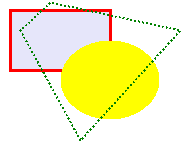
using (var bitmap = new Bitmap(185, 145, PixelFormat.Format24bppRgb, RgbColor.White))
{
    using (Graphics graphics = bitmap.GetGraphics())
    {
        //Draw filled and outlined rectangle
        var pen = new Pen(RgbColor.Red, 3);
        var brush = new SolidBrush(RgbColor.Lavender);
        graphics.FillRectangle(brush, 10, 10, 100, 60);
        graphics.DrawRectangle(pen, 10, 10, 100, 60);

        //Draw filled but non-outlined ellipse
        brush.Color = RgbColor.Yellow;
        graphics.FillEllipse(brush, 60, 40, 100, 80);

        //Draw outlined but non-filled polygon
        pen.Color = RgbColor.Green;
        pen.DashStyle = System.Drawing.Drawing2D.DashStyle.Dot;
        pen.Width = 2;
        System.Drawing.Point[] points = {
            new System.Drawing.Point(20, 30), new System.Drawing.Point(50, 2),
            new System.Drawing.Point(180, 30), new System.Drawing.Point(80, 140)
        };
        graphics.DrawPolygon(pen, points);
    }
    bitmap.Save(@"Images\Output\shapesGDI.png");
}
You might notice that methods described above are similar to methods of the System.Drawing.Graphics class. If you rewrite the previous code in order to use the System.Drawing.Graphics class, instead of Aurigma.GraphicsMill.Drawing.Graphics, and the method calls remain untouched, the result will be as follows:
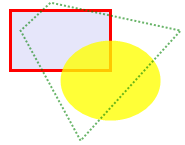
using (var bitmap = new Bitmap(185, 145, PixelFormat.Format24bppRgb, RgbColor.White))
{
    using (System.Drawing.Graphics graphics = bitmap.GetGdiPlusGraphics())
    {
        graphics.SmoothingMode = System.Drawing.Drawing2D.SmoothingMode.AntiAlias;

        //Draw filled and outlined rectangle
        var pen = new System.Drawing.Pen(System.Drawing.Color.Red, 3);
        var brush = new System.Drawing.SolidBrush(System.Drawing.Color.Lavender);
        graphics.FillRectangle(brush, 10, 10, 100, 60);
        graphics.DrawRectangle(pen, 10, 10, 100, 60);

        //Draw filled but non-outlined ellipse
        brush.Color = System.Drawing.Color.FromArgb(200, System.Drawing.Color.Yellow);
        graphics.FillEllipse(brush, 60, 40, 100, 80);

        //Draw outlined but non-filled polygon
        pen.Color = System.Drawing.Color.FromArgb(150, System.Drawing.Color.Green);
        pen.DashStyle = System.Drawing.Drawing2D.DashStyle.Dot;
        pen.Width = 2;
        System.Drawing.Point[] points = {
            new System.Drawing.Point(20, 30), new System.Drawing.Point(50, 2),
            new System.Drawing.Point(180, 30), new System.Drawing.Point(80, 140)
        };
        graphics.DrawPolygon(pen, points);
    }
    bitmap.Save(@"Images\Output\shapesGDIPlus.png");
}
Each class, Aurigma.GraphicsMill.Drawing.Graphics and System.Drawing.Graphics, have their own highs and lows. We recommend that you read the AdvancedDrawing.Graphics vs Drawing.Graphics vs System.Drawing.Graphics topic before making a decision on which class to use.
See Also
Reference
- Aurigma.GraphicsMill.Drawing.Graphics Class
- Graphics.DrawRectangle Overload
- Graphics.FillRectangle Overload
- Graphics.DrawEllipse Overload
- Graphics.FillEllipse Overload
- Graphics.DrawPie Overload
- Graphics.FillPie Overload
- Graphics.DrawPolygon
- Graphics.FillPolygon Overload
- Pen Class
- Brush Class