- About Graphics Mill
- What's New?
- Breaking Changes in Graphics Mill 12
- Breaking Changes in Graphics Mill 11
- Features
- Supported File Formats
- System Requirements
- Getting Started
- Working with Image Formats
- Transforming Images (Resize, Rotate, Crop)
- Working with Metadata
- Color Management and Color Reduction
- Drawing Text and Graphics
- Color Keying (Green Screen Removal)
- Channels and Pixel Data
- Color and Tone Correction
- Working with Photoshop (PSD) Files
- Image Filters
- Processing Large Images
- Basics of Image Processing
- Troubleshooting
- Class Library Reference
- Aurigma.GraphicsMill Namespace
- Aurigma.GraphicsMill.Codecs Namespace
- Aurigma.GraphicsMill.Codecs.ClippingPath Namespace
- Aurigma.GraphicsMill.Codecs.Psd Namespace
- Aurigma.GraphicsMill.Drawing Namespace
- ArtTextFrame Class
- AutoSizeAnchor Enumeration
- AutoSizeMode Enumeration
- BeginDrawEventArgs Class
- BoundedText Class
- Brush Class
- CharInfo Class
- CharStyle Class
- ClippingPathCollection Class
- ColorStop Class
- ContainerItem Class
- ContainerItemCollection Class
- CopyfittingMode Enumeration
- CustomFontRegistry Class
- DigitType Enumeration
- DoublePathText Class
- DoublePathTextFrame Class
- Drawer Class
- DrawEventArgs Class
- EndDrawEventArgs Class
- FallbackFontCollection Class
- FamilyStyleCollisionPolicy Enumeration
- FillingRule Enumeration
- FirstBaselineOffset Enumeration
- Font Class
- FontAddResult Class
- FontAddStatus Enumeration
- FontFallbackException Class
- FontInfo Class
- FontMetrics Class
- FontMissingEventArgs Class
- FontRegistry Class
- GradientBrush Class
- Graphics Class
- GraphicsContainer Class
- ImageItem Class
- IndexedColorCollection Class
- InstalledFontRegistry Class
- InvalidStyleValueException Class
- Item Class
- Layer Class
- LinearGradientBrush Class
- LineCap Enumeration
- LineJoin Enumeration
- MainPath Enumeration
- OpenTypeFeature Structure
- OpenTypeFeatureTag Enumeration
- ParagraphStyle Class
- Path Class
- Path Members
- Path Constructor
- Path Methods
- ApplyTransform Method
- Clear Method
- Close Method
- Create Method
- CurveTo Method
- Dispose Method
- DrawEllipse Method
- DrawPath Method
- DrawRectangle Method
- DrawText Method
- Ellipse Method
- FitCurves Method
- Flatten Method
- GetAlphaContour Method
- GetArea Method
- GetBounds Method
- GetContour Method
- GetHashCode Method
- GetLength Method
- GetObjectData Method
- GetOuterContours Method
- Inflate Method
- Intersect Method
- Invert Method
- LineTo Method
- MoveTo Method
- OffsetContour Method
- Rectangle Method
- Rotate Method
- Scale Method
- Simplify Method
- Smooth Method
- Split Method
- Subtract Method
- ToGdiPlusGraphicsPath Method
- Translate Method
- Union Method
- Widen Method
- Xor Method
- Path Properties
- PathBoundedText Class
- PathPoint Structure
- PathPointCollection Class
- PathPointType Enumeration
- PathText Class
- PathTextAlignment Enumeration
- PathTextFrame Class
- Pen Class
- PlainText Class
- PointTextFrame Class
- PostscriptNameCollisionPolicy Enumeration
- RadialGradientBrush Class
- ShapeItem Class
- ShapeTextFrame Class
- SoftMask Class
- SoftMaskMethod Enumeration
- SolidBrush Class
- StringMeasure Structure
- Text Class
- TextAlignment Enumeration
- TextDirection Enumeration
- TextException Class
- TextFrame Class
- TextItem Class
- TextOrientation Enumeration
- TilingBrush Class
- UnknownStyleNameException Class
- UnknownTagException Class
- VerticalAlignment Enumeration
- Aurigma.GraphicsMill.Drawing.Art Namespace
- Aurigma.GraphicsMill.Drawing.Effects Namespace
- Aurigma.GraphicsMill.Licensing Namespace
- Aurigma.GraphicsMill.Templates Namespace
- Aurigma.GraphicsMill.Transforms Namespace
- Licensing
- End User License Agreement
- Copyright Notices
Path.Widen Method (Pen, Single)
Applies to: Graphics Mill 12.1, 6.x-12.x (may differ)
Replaces the path with the outline of its stroke drawn with the specified pen, using the specified arc tolerance.
Namespace:
Aurigma.GraphicsMill.Drawing
Assembly:
Aurigma.GraphicsMill (in Aurigma.GraphicsMill.dll)
Syntax
public void Widen(
	Pen pen,
	float arcTolerance
)
Parameters
- pen
- The pen. Its width, line join, line cap, miter limit, dash pattern, and dash offset are used.
- arcTolerance
-
Type: System.Single
The largest allowed deviation of a round corner or cap from the true arc. Must be greater than 0.
Remarks
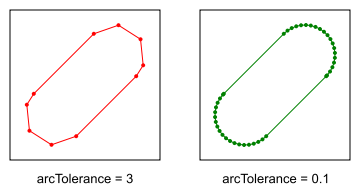
Round joins and round caps are made of straight segments. The arcTolerance parameter is the largest allowed distance between these segments and the true arc. A smaller value gives more segments and a smoother result. A larger value gives fewer segments, so the path has fewer points and is faster to process. The Widen(Pen) overload uses 0.1.
The value is in path units, so choose it relative to the output size. For example, 0.1 is invisible when one unit is one pixel. It may be visible if you scale the path up a lot later.
Examples
var pen = new Pen(RgbColor.Black, 60f)
{
    LineJoin = LineJoin.Round,
    LineCap = LineCap.Round
};

var coarse = new Path();
coarse.MoveTo(45, 105);
coarse.LineTo(105, 45);

var fine = new Path(coarse);

// Round caps deviate from the true arc by up to 3 units. They have few points.
coarse.Widen(pen, 3f);

// Round caps deviate from the true arc by up to 0.1 units (the default). They have many points.
fine.Widen(pen, 0.1f);
The round caps with a large and a small arc tolerance. The dots show the points of the paths.
Exceptions
| Exception | Condition |
|---|---|
| System.ArgumentNullException | The pen is null. |
| System.ArgumentOutOfRangeException | The pen width is not greater than 0, the miter limit is less than 1, or the arc tolerance is not greater than 0. |