- About Graphics Mill
- What's New?
- Breaking Changes in Graphics Mill 12
- Breaking Changes in Graphics Mill 11
- Features
- Supported File Formats
- System Requirements
- Getting Started
- Working with Image Formats
- Transforming Images (Resize, Rotate, Crop)
- Working with Metadata
- Color Management and Color Reduction
- Drawing Text and Graphics
- Color Keying (Green Screen Removal)
- Channels and Pixel Data
- Color and Tone Correction
- Working with Photoshop (PSD) Files
- Image Filters
- Processing Large Images
- Basics of Image Processing
- Troubleshooting
- Class Library Reference
- Aurigma.GraphicsMill Namespace
- Aurigma.GraphicsMill.Codecs Namespace
- Aurigma.GraphicsMill.Codecs.ClippingPath Namespace
- Aurigma.GraphicsMill.Codecs.Psd Namespace
- Aurigma.GraphicsMill.Drawing Namespace
- ArtTextFrame Class
- AutoSizeAnchor Enumeration
- AutoSizeMode Enumeration
- BeginDrawEventArgs Class
- BoundedText Class
- Brush Class
- CharInfo Class
- CharStyle Class
- ClippingPathCollection Class
- ColorStop Class
- ContainerItem Class
- ContainerItemCollection Class
- CopyfittingMode Enumeration
- CustomFontRegistry Class
- DigitType Enumeration
- DoublePathText Class
- DoublePathTextFrame Class
- Drawer Class
- DrawEventArgs Class
- EndDrawEventArgs Class
- FallbackFontCollection Class
- FamilyStyleCollisionPolicy Enumeration
- FillingRule Enumeration
- FirstBaselineOffset Enumeration
- Font Class
- FontAddResult Class
- FontAddStatus Enumeration
- FontFallbackException Class
- FontInfo Class
- FontMetrics Class
- FontMissingEventArgs Class
- FontRegistry Class
- GradientBrush Class
- Graphics Class
- GraphicsContainer Class
- ImageItem Class
- IndexedColorCollection Class
- InstalledFontRegistry Class
- InvalidStyleValueException Class
- Item Class
- Layer Class
- LinearGradientBrush Class
- LineCap Enumeration
- LineJoin Enumeration
- MainPath Enumeration
- OpenTypeFeature Structure
- OpenTypeFeatureTag Enumeration
- ParagraphStyle Class
- Path Class
- Path Members
- Path Constructor
- Path Methods
- ApplyTransform Method
- Clear Method
- Close Method
- Create Method
- CurveTo Method
- Dispose Method
- DrawEllipse Method
- DrawPath Method
- DrawRectangle Method
- DrawText Method
- Ellipse Method
- FitCurves Method
- Flatten Method
- GetAlphaContour Method
- GetArea Method
- GetBounds Method
- GetContour Method
- GetHashCode Method
- GetLength Method
- GetObjectData Method
- GetOuterContours Method
- Inflate Method
- Intersect Method
- Invert Method
- LineTo Method
- MoveTo Method
- OffsetContour Method
- Rectangle Method
- Rotate Method
- Scale Method
- Simplify Method
- Smooth Method
- Split Method
- Subtract Method
- ToGdiPlusGraphicsPath Method
- Translate Method
- Union Method
- Widen Method
- Xor Method
- Path Properties
- PathBoundedText Class
- PathPoint Structure
- PathPointCollection Class
- PathPointType Enumeration
- PathText Class
- PathTextAlignment Enumeration
- PathTextFrame Class
- Pen Class
- PlainText Class
- PointTextFrame Class
- PostscriptNameCollisionPolicy Enumeration
- RadialGradientBrush Class
- ShapeItem Class
- ShapeTextFrame Class
- SoftMask Class
- SoftMaskMethod Enumeration
- SolidBrush Class
- StringMeasure Structure
- Text Class
- TextAlignment Enumeration
- TextDirection Enumeration
- TextException Class
- TextFrame Class
- TextItem Class
- TextOrientation Enumeration
- TilingBrush Class
- UnknownStyleNameException Class
- UnknownTagException Class
- VerticalAlignment Enumeration
- Aurigma.GraphicsMill.Drawing.Art Namespace
- Aurigma.GraphicsMill.Drawing.Effects Namespace
- Aurigma.GraphicsMill.Licensing Namespace
- Aurigma.GraphicsMill.Templates Namespace
- Aurigma.GraphicsMill.Transforms Namespace
- Licensing
- End User License Agreement
- Copyright Notices
Path.GetContour Method (Bitmap, Channel, Single)
Applies to: Graphics Mill 12.1, 6.x-12.x (may differ)
Gets the contour of the region where the specified channel of a bitmap reaches the specified level.
Namespace:
Aurigma.GraphicsMill.Drawing
Assembly:
Aurigma.GraphicsMill (in Aurigma.GraphicsMill.dll)
Syntax
Parameters
- bitmap
- A bitmap to find the contour in.
- channel
- The channel to trace.
- level
-
Type: System.Single
The level as a fraction of the largest channel value, greater than0and not greater than1.
Return Value
A Path object that contains one closed subpath for each outer boundary and each hole. It is empty (nevernull) when no pixel reaches the level.Remarks
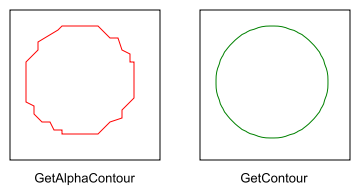
The contour has sub-pixel accuracy. Its points are interpolated between pixel centers, so anti-aliased edges and soft masks give smooth lines. GetAlphaContour() follows pixel edges, so its contour has steps.
The pixel (x, y) covers the area from x to x + 1 and from y to y + 1. Pixels outside the bitmap count as 0, so a region that touches the border is closed just outside the bitmap.
You can trace any channel of any pixel format except the spot ones. Alpha of a bitmap without an alpha channel is 1 everywhere. An indexed bitmap is traced in the colors and alpha of its palette.
All subpaths have consistent directions, so you can fill the contour with either filling rule.
The contours of this method and of GetAlphaContour() are offset by half a pixel from each other. Do not mix the contours of the two methods.
Examples
// Trace the alpha channel at 50% with sub-pixel accuracy.
var contour = Path.GetContour(image, Channel.Alpha, 0.5f);
The contours that GetAlphaContour and GetContour return for a small image of a circle, scaled four times.
Exceptions
| Exception | Condition |
|---|---|
| System.ArgumentNullException | The bitmap is null. |
| System.ArgumentOutOfRangeException | The channel is not defined, or the level is out of range. |