- About Graphics Mill
- What's New?
- Breaking Changes in Graphics Mill 12
- Breaking Changes in Graphics Mill 11
- Features
- Supported File Formats
- System Requirements
- Getting Started
- Working with Image Formats
- Transforming Images (Resize, Rotate, Crop)
- Working with Metadata
- Color Management and Color Reduction
- Drawing Text and Graphics
- Color Keying (Green Screen Removal)
- Channels and Pixel Data
- Color and Tone Correction
- Working with Photoshop (PSD) Files
- Image Filters
- Processing Large Images
- Basics of Image Processing
- Troubleshooting
- Class Library Reference
- Aurigma.GraphicsMill Namespace
- Aurigma.GraphicsMill.Codecs Namespace
- Aurigma.GraphicsMill.Codecs.ClippingPath Namespace
- Aurigma.GraphicsMill.Codecs.Psd Namespace
- Aurigma.GraphicsMill.Drawing Namespace
- Aurigma.GraphicsMill.Drawing.Art Namespace
- Aurigma.GraphicsMill.Drawing.Effects Namespace
- Aurigma.GraphicsMill.Licensing Namespace
- Aurigma.GraphicsMill.Templates Namespace
- Aurigma.GraphicsMill.Transforms Namespace
- AddNoise Class
- AdjustHsl Class
- AutoCrop Class
- BezierTransform Class
- Blender Class
- BlenderOnInitEventArgs Class
- BlendMode Enumeration
- Blur Class
- Brightness Class
- BrightnessContrast Class
- ChannelBalance Class
- CnvTransform Class
- ColorConverter Class
- ColorManagementEngine Enumeration
- ColorOverlay Class
- ColorQuantizationAlgorithm Enumeration
- ColorTransformationIntent Enumeration
- CombineMode Enumeration
- Combiner Class
- CombinerOnInitEventArgs Class
- ContiguousBackgroundRemoval Class
- Contrast Class
- Crop Class
- Cylindrize Class
- Desaturate Class
- DistributionKind Enumeration
- DitheringType Enumeration
- EdgeDetect Class
- EdgeDetectMode Enumeration
- Emboss Class
- FadeType Enumeration
- Flip Class
- FlipType Enumeration
- FloodFill Class
- FloodFillMode Enumeration
- GreenScreenRemoval Class
- HistogramEqualize Class
- IBitmapTransform Interface
- ImageTransmitter Class
- InterpolationMode Enumeration
- Invert Class
- Levels Class
- Lut Class
- LutInterpolationMode Enumeration
- LutTransform Class
- MaskTransform Class
- Matrix Class
- MatrixTransform Class
- Maximum Class
- Median Class
- Minimum Class
- Mosaic Class
- RemoveAlpha Class
- Resize Class
- ResizeInterpolationMode Enumeration
- ResizeMode Enumeration
- ResolutionModifier Class
- Rotate Class
- ScaleAlpha Class
- SetAlpha Class
- Shadow Class
- Sharpen Class
- SmartBlur Class
- Solarize Class
- Spray Class
- StackBlur Class
- Texturize Class
- Transform Class
- Transparentize Class
- UnsharpMask Class
- Licensing
- End User License Agreement
- Copyright Notices
ContiguousBackgroundRemoval Class
Makes the background of an image transparent.
Namespace:
Aurigma.GraphicsMill.Transforms
Assembly:
Aurigma.GraphicsMill (in Aurigma.GraphicsMill.dll)
Syntax
public sealed class ContiguousBackgroundRemoval : TransformRemarks
The background is the part of the image that can be reached from the image border through pixels of a similar color. The transform finds it with a flood fill that starts from the whole border. The alpha of every background pixel becomes 0. Other pixels do not change.
Pixels of the background color that the subject encloses stay opaque, for example, the inner parts of letters or a white shirt against a white wall. This makes the transform a good choice for logos, product photos, and portraits. To make a color transparent everywhere in the image, use the Transparentize transform instead.
Colors are compared as CIE L*a*b* distances (delta E, CIE76). The image is converted to Lab with its color profile, or with the default profile of its color model. This conversion is used only to find the background. The colors of the result are not converted.
The background color is BackgroundColor. If it is null, the median color of the opaque border pixels is used. Set it explicitly when the subject touches the image border.
A pixel joins the background when two conditions are met. Its color differs from the background color by no more than Tolerance. Its color also differs from a neighboring background pixel by no more than StepTolerance. So Tolerance limits the whole color range of the background, and StepTolerance limits how fast the background color can change from one pixel to the next. A smooth gradient or a vignette stays within StepTolerance, so it is removed. A sharp edge of the subject exceeds it and stops the flood fill, even if the color of the subject is within Tolerance.
The colors are compared on a slightly blurred copy of the image, so that noise, such as JPEG artifacts, does not make the edge ragged. The blur can make a thin line look like background. So after the flood fill, the original color of each background pixel is compared with the typical color of the background around it. If the difference is larger than DetailThreshold, the pixel becomes a part of the subject again. Pixels next to the edges of the subject are not checked.
To remove more of the background, increase Tolerance and StepTolerance. If parts of the subject are removed, decrease them, first of all StepTolerance. If thin lines of the subject disappear, decrease DetailThreshold. If specks of noise stay in the background, increase it.
The transform accepts all pixel formats except the spot ones. The result has the alpha version of the source pixel format with the same bit depth. For example, RGB becomes ARGB, and CMYK becomes ACMYK. A source with an alpha channel keeps its pixel format. Its transparent pixels count as background whatever their color. Indexed images become Format32bppArgb.
The alpha of the result is binary: 0 for the background, unchanged for the rest.
Examples
using (var reader = ImageReader.Create(@"Images\Product.jpg"))
using (var removal = new ContiguousBackgroundRemoval(RgbColor.White))
using (var writer = ImageWriter.Create(@"Images\Output\ProductNoBackground.png"))
{
    // Pixels that differ from white by more than 20 (delta E) belong to the product.
    removal.Tolerance = 20f;

    Pipeline.Run(reader + removal + writer);
}
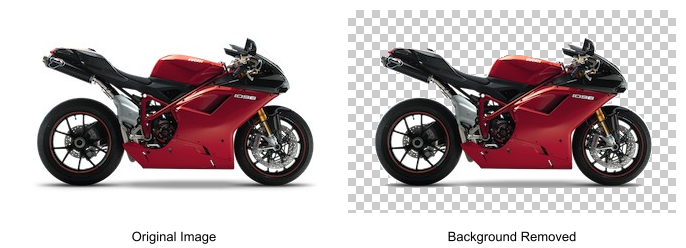
The original image and the result with the background removed.